


Summary:
With ABELDent Chat, there is a default amount of data the Chat window can handle: 60 or 65kb. If this limit is surpassed, it results in a blank chat window.
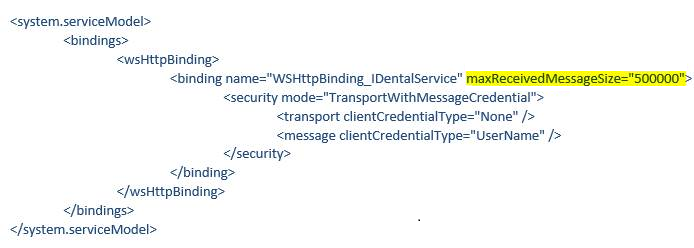
The best practice to mitigate this from occurring is to close old chat messages, but you can also increase the limit by editing the Abeldent.chat.exe.config.
To increase the message size limit:
Steps:
- Navigate to the ABELDEnt Chat folder within the installation folder for ABELDent CS
- Locate and Right-click on the ABELDent Chat.exe CONFIG file
- Select Open with > Notepad
- Find <binding name="WSHttpBinding_IDentalService">
- Add: maxReceivedMessageSize="500000 into the line

Product (s): Abeldent Portal
Category: Messaging
Classification: Internal
Date Created: September 25, 2019
Created by: John Scarlett